BlockViz
GuidesMarket CapMarket Cap Treemap

Market Cap Treemap

See market structure by coin or category — switch to delta to spot movers.

Open tool →

Interpretation

What problem this visualization solves

Market structure is hard to grasp from tables or line charts alone.

This visualization answers:

  • who matters most right now (structure)
  • who is driving change (flows)
  • how today’s snapshot fits into a trend (development)

By combining a treemap with a linked time-series chart, it connects market composition with market evolution.

What you’re looking at
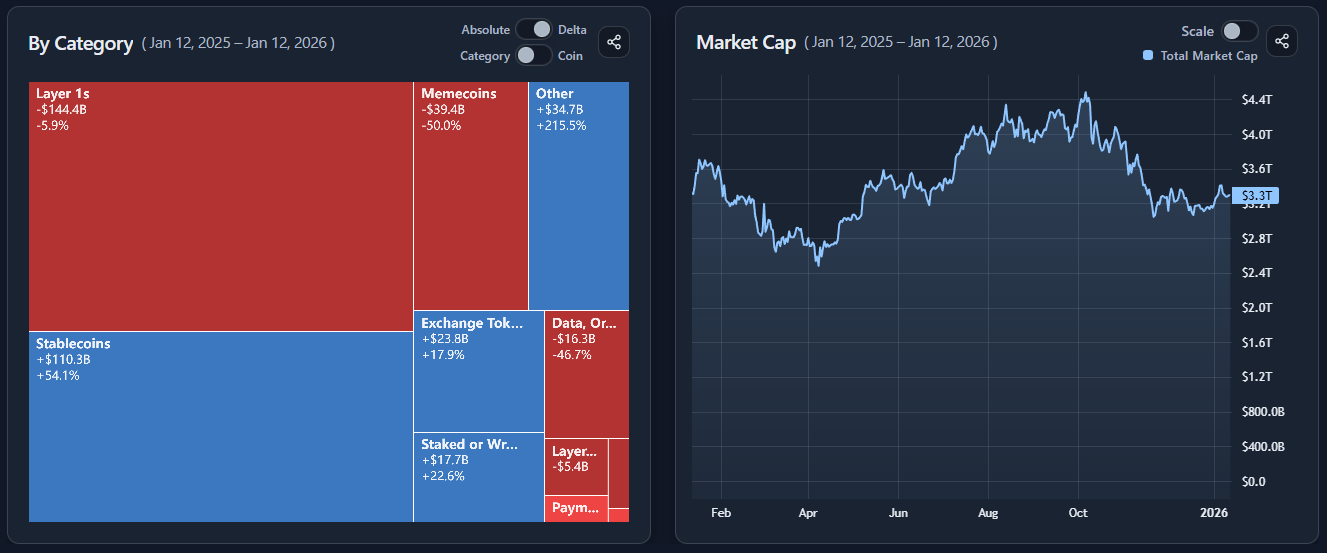
You are looking at two synchronized views:

  • a treemap showing market structure at a point in time
  • a line chart showing market cap development over the selected period

The treemap answers “how the market is composed”.
The line chart answers “how that composition evolved over time”.

Clicking a tile links the two.

Coin vs category views

The treemap can be displayed in two structural modes:

Coin mode

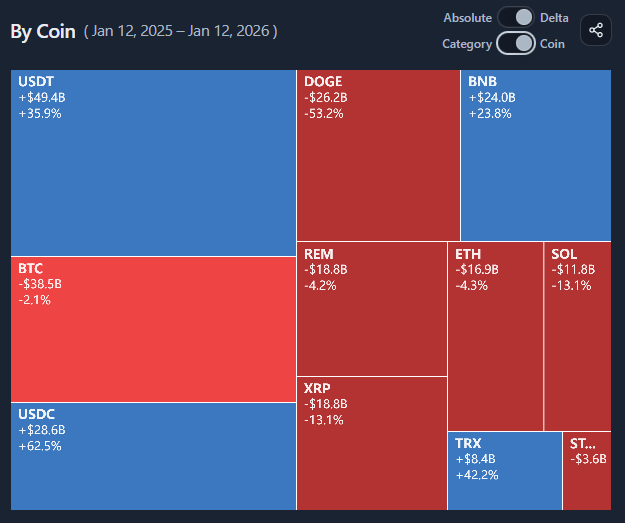
  • each tile represents an individual asset
  • useful for spotting dominant coins and outsized movers

Category mode

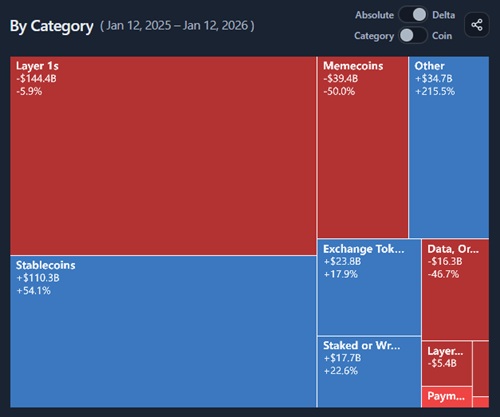
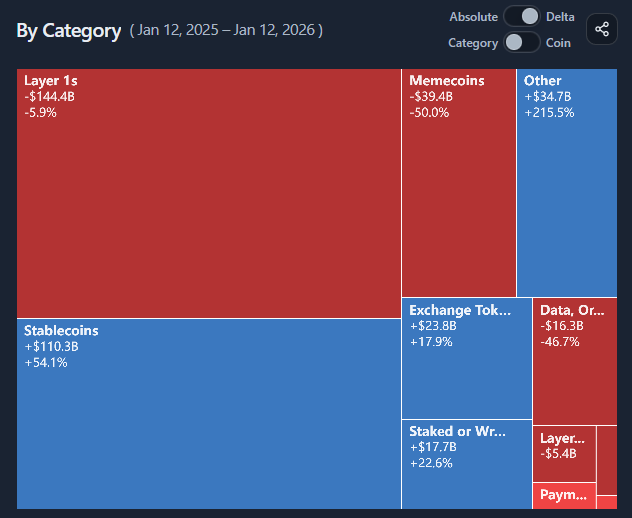
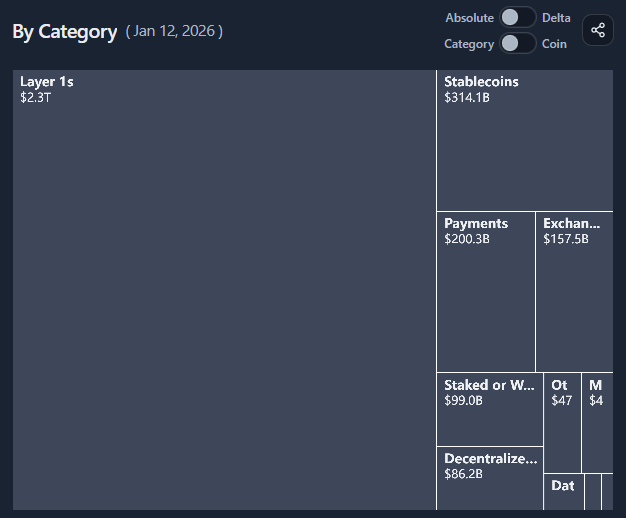
  • tiles represent aggregated sectors (e.g. Layer 1s, Memecoins)
  • useful for understanding sector-level structure and rotation

Switching modes changes the level of abstraction, not the underlying data.

Absolute vs delta views

The treemap can also switch between two analytical lenses:

Absolute mode

  • tile size reflects current market cap
  • shows scale, proportion, and dominance
  • answers: “How big is this relative to the rest?”

Delta mode

  • tile size reflects absolute market cap change
  • color intensity reflects percentage change
  • highlights contributors vs high-momentum movers

Delta mode is about change, not size.

The linked line chart

The line chart on the right provides time context.

  • by default, it shows the total market cap represented by the treemap
  • clicking a tile switches the chart to that coin or category’s market cap over time

This avoids relying on a single snapshot and makes trends explicit.

Remainder: focusing without losing context

When visualizing large universes, showing every small component individually can overwhelm the treemap.

The Remainder option groups all non-selected assets into a single remainder tile.

This allows you to:

  • focus on specific assets or categories
  • preserve full context against the chosen reference basket
  • avoid clutter from many tiny tiles

Remainder is a deliberate aggregation, not a residual — it represents the rest of the market you chose not to display individually.

Common misinterpretations

Large tiles are not always the biggest movers
Size reflects level; delta reflects change.

Red tiles are not necessarily weak assets
They may simply be correcting after large gains.

Treemaps are snapshots
Always use the linked line chart to understand trajectory.

When to use and when not to use

Most useful for

  • understanding market structure
  • spotting dominant coins or sectors
  • identifying contributors vs momentum leaders
  • contextualizing market narratives

Not suitable for

  • precise timing decisions
  • single-asset analysis without context
  • interpreting short-lived noise

Key takeaways

  • Treemaps show structure, not time
  • Delta highlights change, not size
  • Categories reveal sector rotation
  • Remainder keeps focus without losing context

How to use

Selecting structure and lens

Choose:

  • Coin or Category mode to set the structural level
  • Absolute or Delta mode to set the analytical lens

The treemap updates instantly based on these selections.

Reading the treemap

  • tile size reflects size (absolute) or change (delta)
  • color intensity reflects direction and magnitude of change
  • larger tiles draw attention to the most impactful components

Scan for:

  • dominant tiles (structure)
  • unusually colored tiles (momentum)

Using the linked line chart

The line chart shows market cap development over the selected timeframe.

  • default: total market cap of what the treemap represents
  • after clicking a tile: market cap of that coin or category

This helps distinguish temporary spikes from sustained trends.

Using the remainder toggle

Toggle Remainder on to:

  • summarize all non-selected assets into one tile
  • reduce visual clutter
  • keep proportions honest

Toggle it off to:

  • inspect individual components in detail

Use remainder when scale overwhelms readability.

Example workflow

  1. Start in Category + Absolute view to understand structure
  2. Switch to Delta to spot contributors and movers
  3. Click a tile to inspect its market cap trend
  4. Toggle Coin mode for finer detail
  5. Use Remainder to keep focus without losing context
Market Cap Treemap preview

Try it yourself

Market Cap Treemap

Use the interactive tool to explore the same concept with your own time range and settings.